
To create a discussion thread
- On the navbar, click Discussions from the Communication menu
- Click on the Forum and click the name of the Topic in which you want to create a discussion post
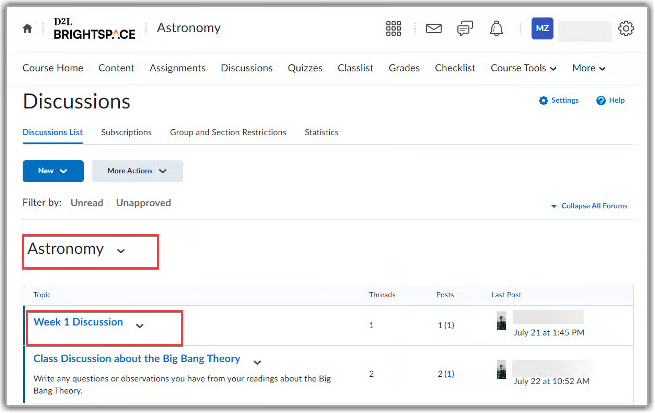
- Click Start a New Thread
- Enter a Subject and type your message in the Post field
- Expand Add attachments to upload files from your device as well as record audio or video files
- Click the Subscribe to this thread box to get updates on any replies to your post
- When complete, click the Post button
Enhance your discussion posts by embedding media.
- On the navbar, click Discussions from the Communication menu
- Click on the Forum and click the name of the Topic in which you want to create a discussion post
- Click Start a New Thread
- Enter a Subject and type your message in the Post field
- Click on the Insert Stuff icon located in the toolbar

- Select Add video note, Insert link or Enter Embed code from the menu
- Click Insert
- The link will then be placed within the Post box
To self-enrol in a group
- From the navbar, select Groups from the Communications menu
- Click on View Available Groups
- Locate the group you want to sign up for and click the blue Join Group link
- After enrolling in the group, it will appear in your My Groups section
For additional support, view the How to Self-Enrol in a Group video for detailed instructions.