
94 University Avenue
Campus Map Building Accessibility Guide
| Room Number | Room Type | Number of Student Seats |
|---|---|---|
| Dunning Hall 10 | Active Learning (AL) | 96 |
| Dunning Hall 11 | Tiered (DT) | 82 |
| Dunning Hall 12 | Tiered (DT) | 85 |
| Dunning Hall 14 | Tiered (DT) | 152 |
| Dunning Hall 27 | Tiered (DT) | 67 |
| Dunning Hall AUD (Room 020) | Auditorium (A) | 425 |


| Number of Student Seats | 96 |
|---|---|
| Room Type (Code) | Active Learning (AL) |
This room is designed as a high-tech, team based active learning classroom.
| Seating Type | Chairs (Movable with castors) |
|---|---|
| Writing Surface for Students | Table (Fixed) |
| Windows | Yes |
| Power/Electrical Outlets at Student Desks | Yes |
| Number of Exits | 2 |
| Writing Surface for Instructor | Whiteboards |
|---|---|
| Presentation Equipment | 24 Pod Screens (2 per table) |
| Projector Screen | N/A |
| Room Audio | Yes |
| Microphone | 1 Handheld, 1 Lapel |
| Features of Podium | Document Camera, Podium PC, Wireless Presentation |
| Connection Type | HDMI with adapter (Micro HDMI, DisplayPort, Mini DisplayPort, USB-C) |
| Access to Space | Door handle is a lever, no automatic door operator |
|---|---|
| Classroom Space |
|
| Feature of Podium | Podium is height adjustable, podium is accessible. |
To locate single user accessible and gender neutral washrooms on campus, please visit the Campus Map.
*Please Note: The Dunning Hall elevator is being replaced in Summer/Fall 2026. This may impact the accessibility of this room.
For more information about this building, visit the Building Accessibility Guide.
For information about Accessibility at Queen's, visit the Queen's Accessibility Hub.
Dunning Hall 11


| Number of Student Seats | 82 |
|---|---|
| Room Type (Code) | Tiered (DT) |
| Seating Type | Chairs (Movable) |
|---|---|
| Writing Surface for Students | Table (Fixed) |
| Windows | Yes |
| Power/Electrical Outlets at Student Desks | Yes |
| Number of Exits | 2 |
| Writing Surface for Instructor | 3 Blackboards |
|---|---|
| Presentation Equipment | 1 Data Projector |
| Projector Screen | Powered |
| Room Audio | Yes |
| Microphone | 1 Handheld, 1 Lapel |
| Features of Podium | Document Camera, Lecture Capture, Wireless Presentation |
| Connection Type | HDMI with adapter (Micro HDMI, DisplayPort, Mini DisplayPort, USB-C) |
| Access to Space | Door handle is a lever, no automatic door operator |
|---|---|
| Classroom Space |
|
| Feature of Podium | Podium is not height adjustable and does not have additional accessibility features. |
To locate single user accessible and gender neutral washrooms on campus, please visit the Campus Map.
*Please Note: The Dunning Hall elevator is being replaced in Summer/Fall 2026. This may impact the accessibility of this room.
For more information about this building, visit the Building Accessibility Guide.
For information about Accessibility at Queen's, visit the Queen's Accessibility Hub.
Dunning Hall 12


| Number of Student Seats | 85 |
|---|---|
| Room Type (Code) | Tiered (DT) |
| Seating Type | Chairs (Movable) |
|---|---|
| Writing Surface for Students | Table (Fixed) |
| Windows | Yes |
| Power/Electrical Outlets at Student Desks | Yes |
| Number of Exits | 2 |
| Writing Surface for Instructor | 3 Blackboards |
|---|---|
| Presentation Equipment | 1 Data Projector |
| Projector Screen | Powered |
| Room Audio | Yes |
| Microphone | 1 Handheld, 1 Lapel |
| Features of Podium | Document Camera, Lecture Capture, Wireless Presentation |
| Connection Type | HDMI with adapter (Micro HDMI, DisplayPort, Mini DisplayPort, USB-C) |
| Access to Space | Door handle is a lever, no automatic door operator |
|---|---|
| Classroom Space |
|
| Feature of Podium | Podium is not height adjustable and does not have additional accessibility features. |
To locate single user accessible and gender neutral washrooms on campus, please visit the Campus Map.
*Please Note: The Dunning Hall elevator is being replaced in Summer/Fall 2026. This may impact the accessibility of this room.
For more information about this building, visit the Building Accessibility Guide.
For information about Accessibility at Queen's, visit the Queen's Accessibility Hub.
Dunning Hall 14


| Number of Student Seats | 152 |
|---|---|
| Room Type (Code) | Tiered (DT) |
| Seating Type | Chairs (Movable) |
|---|---|
| Writing Surface for Students | Table (Fixed) |
| Windows | Yes |
| Power/Electrical Outlets at Student Desks | Yes |
| Number of Exits | 2 |
| Writing Surface for Instructor | 4 Blackboards |
|---|---|
| Presentation Equipment | 1 Data Projector |
| Projector Screen | Powered |
| Room Audio | Yes |
| Microphone | 1 Handheld, 1 Lapel |
| Features of Podium | Document Camera, Lecture Capture, Wireless Presentation |
| Connection Type | HDMI with adapter (Micro HDMI, DisplayPort, Mini DisplayPort, USB-C) |
| Access to Space | Door handle is a knob, no automatic door operator |
|---|---|
| Classroom Space |
|
| Feature of Podium | Podium is not height adjustable, podium is accessible |
To locate single user accessible and gender neutral washrooms on campus, please visit the Campus Map.
*Please Note: The Dunning Hall elevator is being replaced in Summer/Fall 2026. This may impact the accessibility of this room.
For more information about this building, visit the Building Accessibility Guide.
For information about Accessibility at Queen's, visit the Queen's Accessibility Hub.
Dunning Hall 27


| Number of Student Seats | 67 |
|---|---|
| Room Type (Code) | Tiered (DT) |
| Seating Type | Chairs (Movable) |
|---|---|
| Writing Surface for Students | Table (Fixed) |
| Windows | Yes |
| Power/Electrical Outlets at Student Desks | Yes |
| Number of Exits | 2 |
| Writing Surface for Instructor | 2 Blackboards |
|---|---|
| Presentation Equipment | 1 Data Projector |
| Projector Screen | Powered |
| Room Audio | Yes |
| Microphone | 1 Handheld, 1 Lapel |
| Features of Podium | Document Camera, Lecture Capture, Wireless Presentation |
| Connection Type | HDMI with adapter (Micro HDMI, DisplayPort, Mini DisplayPort, USB-C) |
| Access to Space | Door handle is a knob, no automatic door operator |
|---|---|
| Classroom Space |
|
| Feature of Podium | Podium is not height adjustable and does not have additional accessibility features. |
To locate single user accessible and gender neutral washrooms on campus, please visit the Campus Map.
*Please Note: The Dunning Hall elevator is being replaced in Summer/Fall 2026. This may impact the accessibility of this room.
For more information about this building, visit the Building Accessibility Guide.
For information about Accessibility at Queen's, visit the Queen's Accessibility Hub.
Dunning Hall AUD
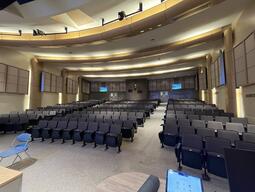


| Number of Student Seats | 425 |
|---|---|
| Room Type (Code) | Auditorium (A) |
| Seating Type | Auditorium Seats |
|---|---|
| Writing Surface for Students | Tablet |
| Windows | No |
| Power/Electrical Outlets at Student Desks | No |
| Number of Exits | 3 |
| Writing Surface for Instructor | No |
|---|---|
| Presentation Equipment | 1 Data Projector |
| Projector Screen | N/A |
| Room Audio | Yes |
| Microphone | 1 Handheld, 1 Lapel |
| Features of Podium | Document Camera, Lecture Capture, Wireless Presentation, Room PC |
| Connection Type | HDMI with adapter (Micro HDMI, DisplayPort, Mini DisplayPort, USB-C) |
| Access to Space | Door has a handle, no automatic door operator |
|---|---|
| Classroom Space |
|
| Feature of Podium | Podium is height adjustable, podium is accessible |
To locate single user accessible and gender neutral washrooms on campus, please visit the Campus Map.
*Please Note: The Dunning Hall elevator is being replaced in Summer/Fall 2026. This may impact the accessibility of this room.
For more information about this building, visit the Building Accessibility Guide.
For information about Accessibility at Queen's, visit the Queen's Accessibility Hub.